


Instagram’s New Carousel Update Could Change How You Create Content 👀💕

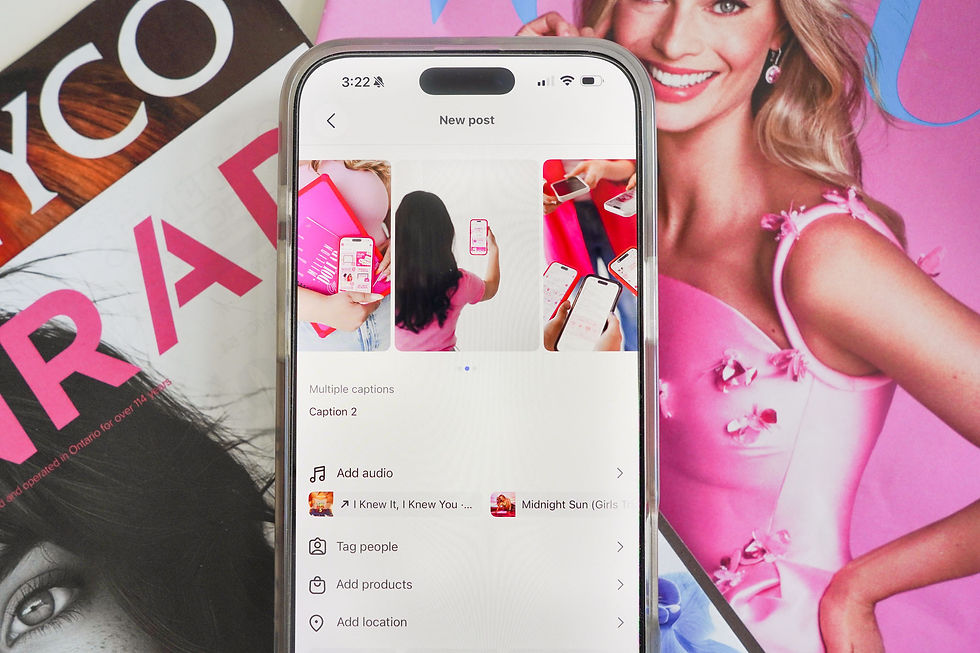
Instagram just rolled out a new carousel feature that gives creators, brands, and business owners another way to create more engaging content, tell stronger stories, and build deeper connections with their audience.
Cue the pink, sparkly, stiletto-shaped confetti because you can now add captions to individual carousel slides! 👠🎉
And while that might sound like a small update, we think it opens up some really exciting opportunities for brands that care about next-level, out-of-the-box content.
For years, creators had two options:
Squeeze all of your information directly onto the graphic itself
Try to fit every detail into the main caption
The result? Overcrowded graphics, lengthy captions, and content that feels way too busy.
With this new update, each carousel slide can have its own supporting context, commentary, explanation, or story.
Instead of making your audience piece together the story on their own, you can guide them through it one slide at a time.
Why This Update Actually Matters
At Socials & Stilettos, we’re always looking at platform updates through one lens:
Does this help brands create a better experience for their audience?
In this case, the answer is yes. This feature isn’t about adding more words to your content. It’s about adding the right words in the right places.
When used strategically, slide captions can help you:
Add context without cluttering your graphics
Build anticipation between slides
Tell longer stories more naturally
Increase engagement by encouraging people to keep swiping
Create a more immersive content experience
Keep your main caption focused and intentional
The reality is that some stories simply need more room to breathe. This feature gives creators and brands that flexibility without sacrificing the integrity of your content or design.
Where We Think This Feature Will Shine
Not every carousel needs slide captions. However, there are a few key content types where this feature is going to shine best:
Photo Dumps That Tell a Story
Instead of simply posting ten photos from an event, trip, or content day, use slide captions to share funny behind-the-scenes moments, lessons learned, unexpected challenges, personal reflections, or small details your audience wouldn’t otherwise know.
This transforms a simple photo dump into an engaging storytelling experience and gives your audience a reason to keep swiping.
Event Recaps That Feel More Immersive
If you’ve ever attended a conference, market, networking event, launch party, or speaking engagement, you know there’s usually far more happening than what the photos show.
Slide captions allow you to guide your audience through the experience by sharing what was happening in each moment, key takeaways from the event, conversations that inspired you, behind-the-scenes details, and lessons you brought back to your business.
Educational Content Without Graphic Overload
One of the biggest mistakes we see with educational carousels is trying to fit too much information onto a single graphic slide. When every slide looks like a textbook page, your audience often stops reading altogether.
Now you can keep your graphics clean and visually appealing while using slide captions to provide additional examples, case studies, bonus tips, clarifications, or common mistakes to avoid.
This creates a much better balance between education and design.
Before & Afters With More Impact
Whether you’re a designer, marketer, coach, therapist, contractor, photographer, or service provider, before-and-after content is often about more than the final result.
The transformation is where the magic happens.
Use slide captions to walk your audience through the original challenge, the strategy behind the transformation, roadblocks encountered along the way, important milestones, and the final outcome.
People don’t just want to see what changed. They want to understand how it changed and the process behind it.
Behind-the-Scenes Content
Behind-the-scenes content has always been one of the most powerful ways to build trust and connection online. Slide captions now allow you to narrate those moments in a much more intentional way.
Whether you’re filming content, preparing for a launch, attending meetings, packaging orders, or working on a client project, you can add context that helps your audience feel like they’re part of the journey.
How to Use This Feature Strategically ✨
Before you rush off and add captions to every single slide, here are a few best practices we’d recommend:
1. Don’t Repeat What’s Already on the Graphic
If your graphic already says it, your slide caption doesn’t need to repeat it.
Instead, use the caption to expand on the idea, share a personal story, provide an example, or offer additional insight.
2. Use It to Reward Curious Viewers
Think of slide captions as bonus content. The people who take the time to read them are often your most engaged audience members. Give them something valuable that adds to the overall experience.
3. Keep It Conversational
This isn’t the place for lengthy essays. Write the way you would speak. Short, natural commentary often feels more engaging than highly polished corporate language.
4. Focus on Storytelling
Ask yourself: “What would someone want to know if they were standing beside me when this happened?”. The answer is often the perfect context to add to your slide caption.
5. Think of Your Content in Layers
One of the biggest opportunities with this update is creating layered content.
Let each element have a job:
Graphic: Grabs attention
Slide Caption: Provides context
Main Caption: Drives conversation
When all three work together, you achieve what we like to call "content synergy". Essentially, the entire post starts working together like a well-oiled machine!
Our Final Thoughts
The businesses that will benefit most from this new feature won’t be the ones adding captions to every slide. They’ll be the ones using it strategically to create stronger storytelling, deeper audience connection, and a more engaging user experience.
Because at the end of the day, building an iconic brand isn’t about creating more content.
It’s about creating better content.
And this update gives us one more way to do exactly that.
Want More Marketing Insights Like This? 👀
Download the Socialista Club App for more marketing tips, trend alerts, platform updates, content ideas, and educational resources designed to help you grow on the go! Tap here to learn more! ✨

Comments